


- The digital sulfuric acid "Recruitment" function has officially launched (Part 1) A dedicated career channel for sulfuric acid workers
Preface
In the sulfuric acid industry, companies struggle to find suitable talent while professionals face cumbersome job-seeking processes—a pain point many deeply understand. To address this, Digital Sulfuric Acid officially launches recruitment and job-seeking features tailored for the sulfuric acid sector. We are committed to precisely matching outstanding talent with companies while opening doors to ideal careers for sulfuric acid professionals.
If you are a professional with years of experience in the sulfuric acid field, the Digital Sulfuric Acid app will become your indispensable job-hunting companion. Focusing exclusively on the sulfuric acid sector, our platform aggregates job listings from relevant companies, enabling precise applications and efficient matching—eliminating the need to search blindly like on other platforms. Below is a guide for job seekers.
The first step: Identity selection and information completion
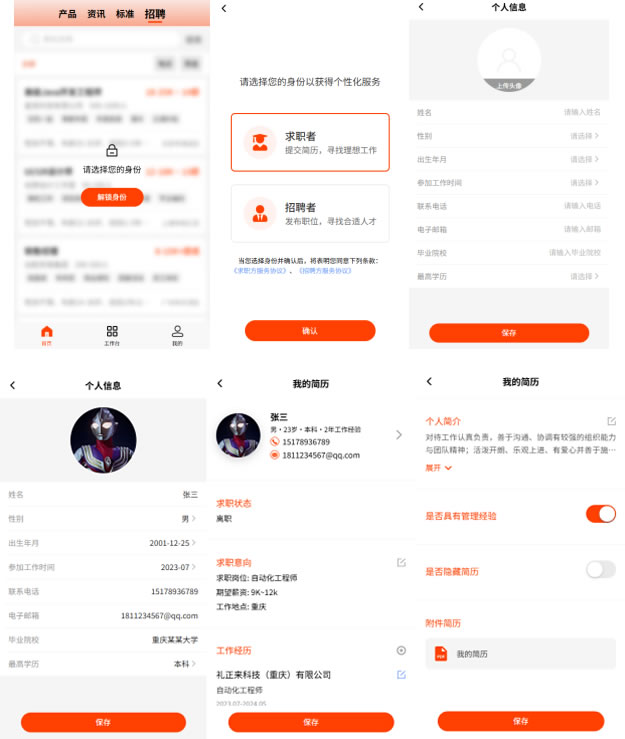
Upon first logging into the app, select your role—“Job Seeker” or “Recruiter.” Note: Once confirmed, your role cannot be changed later, so choose carefully. After selecting your role, complete your basic personal information to help companies better understand and contact you. Then, proceed to the resume editing page to fill in details including your job-seeking status, desired positions, work experience, skill tags, and attach your resume. The more complete your profile, the more likely HR will notice you. Important reminder: If you've held management roles like Team Leader or Plant Manager, select “Management Experience.” Your resume will receive a special marker, helping HR quickly recognize your professional capabilities. If you prefer not to be searchable by companies, you can also choose “Hide Resume.”
Step 2: Browse positions and apply
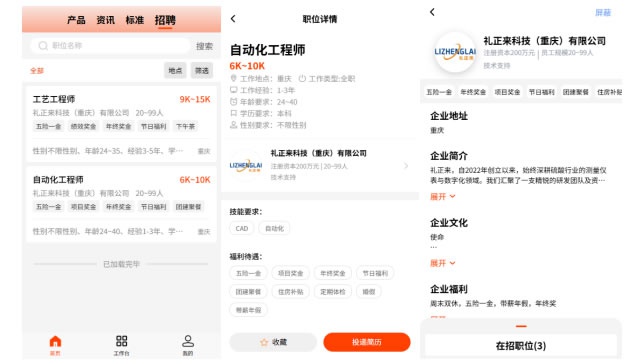
After completing your resume, return to the “Job Listings” section on the homepage. This hub aggregates job postings from companies across the chemical industry, allowing you to filter by your needs. Click on a job to view detailed information, including salary, job responsibilities, and requirements. If you're not interested in a particular company, you can select “Block” to prevent them from viewing your resume. For positions that catch your eye, you can either save them to your favorites or apply directly.
Step 3: Manage the progress of job hunting
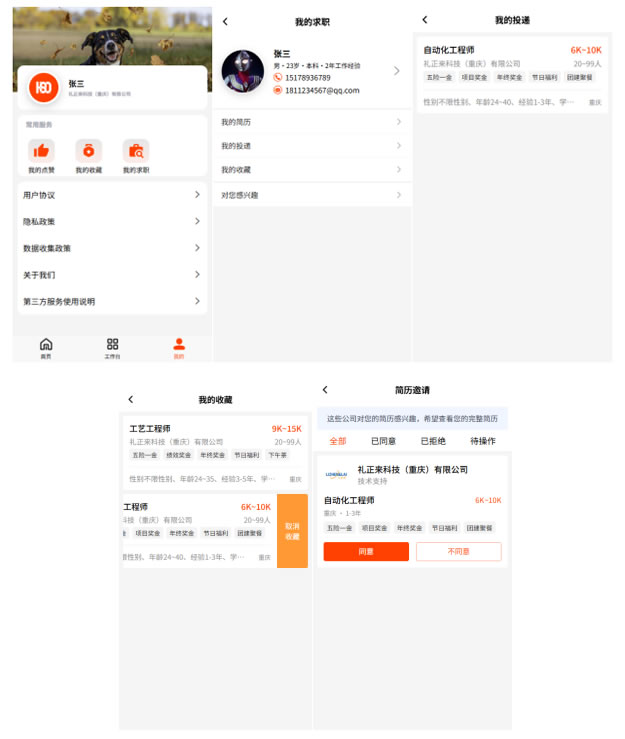
After selecting “Job Seeker” status, the “My Job Search” feature will appear on your “My Profile” page. It includes five sections:
Personal Info: Click to edit and update your profile anytime;
My Resume: Modify or enhance your resume content;
My Applications: View all submitted job application records;
My Favorites: Review positions you've saved as favorites;
Interested in You: If an HR representative sends an invitation, you can view the job details here and decide whether to grant them access to your resume. Prior to your consent, your key information remains private. Only after approval can HR access your full details and contact you.
Conclusion
This concludes the complete user guide for the job seeker interface of Digital Sulfuric Acid's “Recruitment” feature. We hope this tool genuinely assists every professional in the sulfuric acid industry to find their ideal job faster and advance toward broader career opportunities. Wishing you success in your job search and a bright future ahead!
The above details the job seeker features of Digital Sulfuric Acid's “Recruitment” function. How companies can post positions and find talent will be revealed in our next installment! The app release date will be announced in the Digital Sulfuric Acid discussion group. To stay updated on new versions and latest changes, join the group for real-time updates! If you have any questions or better ideas during use, feel free to share them in the discussion group. We sincerely look forward to your participation!

Scan the QR code to join the group
Acquisition method
The official way to obtain the Digital Sulfuric Acid APP is to go to major app stores (supporting Android and Apple devices), search for "Digital Sulfuric Acid", and download and install it!